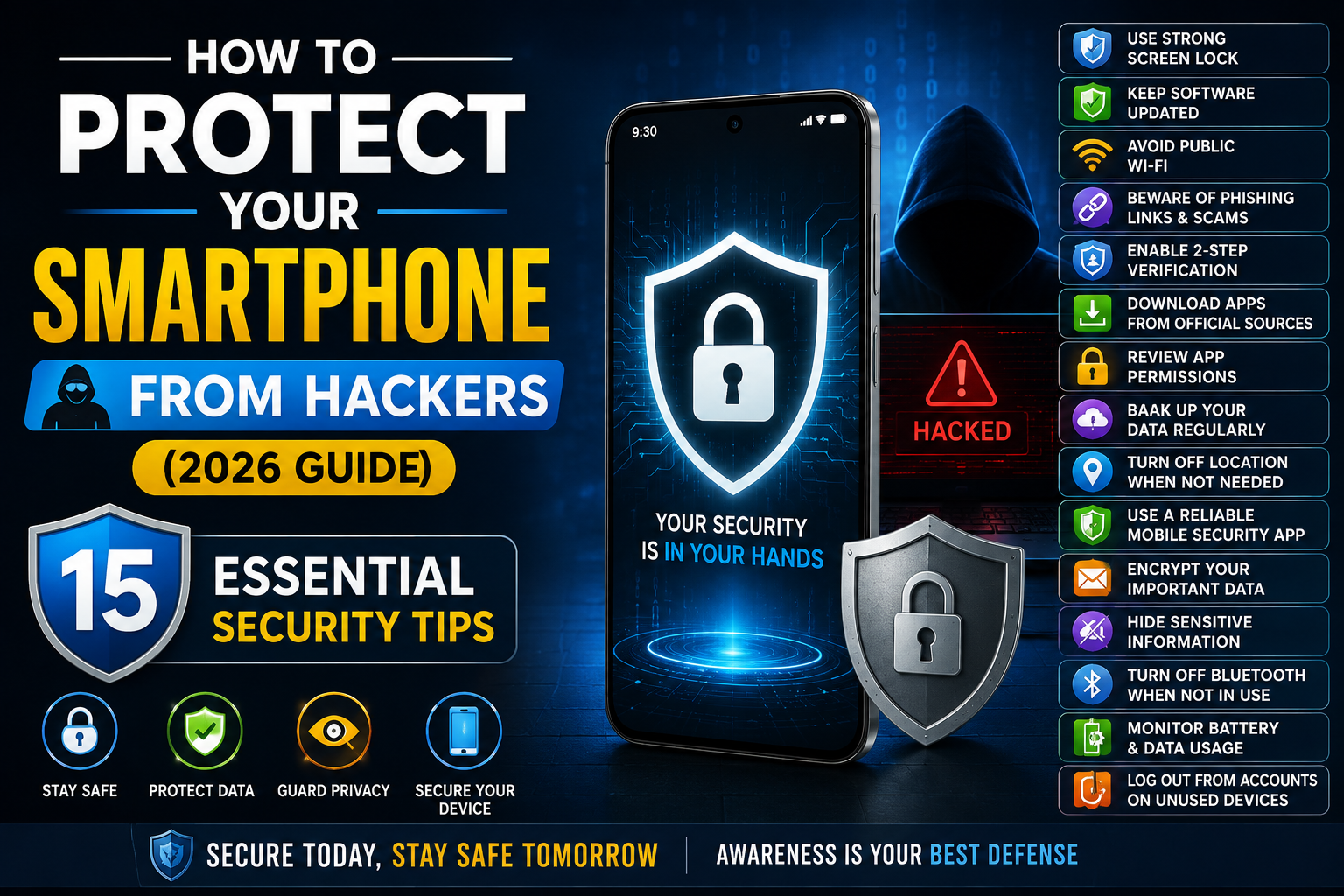
Smartphone protection is a very important and essential step for all smartphone users. In this guide, we will discuss which tricks you can use to protect your smartphone from hackers and how you can apply them. If you are using your smartphone for purposes other than calling and messaging, these methods will be helpful in protecting your stored images, banking apps, passwords, emails, social media accounts, and other confidential information.
Protecting your data is not a tough task, and it can be done easily if you follow our guide while using your smartphone.
Why Smartphone Security Matters
If you want to understand why smartphone security is a major concern, you should read these points to understand the importance of taking proper security measures.
Developing better smartphone security habits can help reduce various digital risks and keep your device and personal information safer. Good security practices can protect personal data, reduce the risk of financial fraud, keep online accounts secure, and help protect private photos, videos, documents, and other important files. They can also reduce the risk of malware, unauthorized access, phishing scams, and suspicious links. Additionally, strong security habits can improve your digital privacy and help protect your data if your smartphone is lost or stolen, making everyday internet and app usage safer.
1. Always Keep Your Phone Updated
Software updates often include important security patches that fix newly discovered vulnerabilities. Smartphone companies provide security updates to help protect your device from potential security threats, so you should keep your smartphone updated regularly.
Enable automatic updates, install Android or iOS updates when they become available, and keep your apps updated through trusted app stores. Keeping your software up to date can help protect your smartphone from known security risks.
2. Use a Strong Screen Lock
Enable a secure screen lock on your smartphone to help protect your device and personal information. Recommended options include fingerprint or face unlock, a six-digit or longer PIN, or a strong alphanumeric password. Avoid using easy-to-guess options such as 123456, 000000, birthdays, or simple unlock patterns, as they can be easier for others to guess.
3. Download Apps Only from Trusted Sources
You must be download app in your mobiles from trusted source which are giving below.
Download apps only from trusted sources such as the Google Play Store, Apple App Store, APK files from reputable websites, or official brand app stores where available. Avoid downloading APK files from unknown or unverified websites, as they may contain malware or other harmful software that could put your device and personal information at risk.
4. Check App Permissions Regularly
Some apps request permissions they don’t actually need. So after checking you must remove unnecessary permissions from your installed applications.
Regularly review the permissions granted to your apps, including access to the camera, microphone, location, contacts, SMS, and storage. If an app has permission that it does not need for its main function, consider revoking that access. This can help reduce unnecessary access to your personal information and improve your overall privacy.
5. Enable Two-Factor Authentication (2FA)
2FA is best way of security in which we have enable google authentication code which are changes with in 30 second and its is unbreakable from hacks so you should use it for protection.
Add an extra layer of protection to important accounts such as email, banking, social media, and cloud storage by enabling two-factor authentication (2FA). Even if someone discovers or steals your password, 2FA can help prevent unauthorized access by requiring an additional verification step.
6. Avoid Public Wi-Fi for Sensitive Tasks
Public Wi-Fi networks can be convenient, but they are not always secure. Avoid using public Wi-Fi for sensitive activities such as online banking, shopping, changing passwords, or making financial transactions. If you need to connect to a public network, avoid entering personal, financial, or other sensitive information while using it.
7. Never Click Suspicious Links
Avoid clicking suspicious links because cyber criminals may use them to spread malware or steal your personal information. Phishing messages can arrive through SMS, email, Whats App, Telegram, or social media platforms.
Be especially careful with links that promise prizes, request urgent account verification, or promote unexpected offers. Always verify the source before clicking any unfamiliar link.
8. Turn On Find My Device
Google provides remote device management features that can help you locate and protect your smartphone if it is lost or stolen. When enabled, these features may allow you to view the device’s location, lock it remotely, erase personal data, or display a message with contact information on the screen. It is important to enable this feature in advance so you can use it when you need it.
9. Lock Sensitive Apps
Many smartphones offer app-level security features that can add an extra layer of protection to sensitive applications. Consider protecting apps such as banking, gallery, notes, password managers, and payment apps with a strong PIN, password, or fingerprint lock when the feature is available.
This can help prevent unauthorized access to your personal and financial information if someone else gains access to your phone.
10. Back Up Your Data Regularly
Regularly backing up your smartphone data can help protect important information if your phone is damaged, lost, stolen, or compromised. Make sure to back up essential files such as photos, videos, contacts, documents, and messages. You can use cloud storage or a local backup on another trusted device, depending on your needs and preferences.
11. Avoid Charging at Unknown USB Ports
Public USB charging stations can pose security risks because some ports may allow data transfer along with charging. To reduce these risks, avoid connecting your smartphone directly to unfamiliar USB charging ports whenever possible. Instead, use your own charger and power adapter, carry a power bank when traveling, or use a charge-only cable or USB data blocker for an extra layer of protection.
12. Use Strong Passwords
Use a different and unique password for every important account, and avoid simple details such as your date of birth, mobile number, birth year, or birthplace. A strong password should combine uppercase and lowercase letters, numbers, and special characters to make it harder to guess.
You should also avoid using the same password for multiple accounts, because if one password is compromised, other accounts could also be at risk.
13. Turn Off Bluetooth and Wi-Fi When Not in Use
Keeping wireless features enabled when you are not using them can create unnecessary security and privacy risks. It is a good practice to turn off features such as Bluetooth, Wi-Fi, or other wireless connections when they are not needed.
This can help protect your privacy, reduce unwanted connection attempts, and save some battery power.
14. Monitor Your Banking Apps
Regularly monitor your bank and financial accounts for any unusual or unauthorized activity. Make sure OTP-based transaction verification is enabled in your mobile banking apps to add an extra layer of security.
You should also turn on transaction alerts so you receive immediate notifications whenever a transaction or other activity occurs on your account.
15. Use Built-in Security Features
You must be enables all mobile in-build security features for reducing hacks or data loss.
Modern smartphones include several useful privacy and security features that can help protect your personal information and device. Features such as Secure Folder or Private Space can keep sensitive files and apps protected, while App Lock adds an extra layer of security to selected applications. Theft Protection can help safeguard your device if it is lost or stolen, and the Privacy Dashboard and Permission Manager allow you to monitor and control how apps access your data.
You can also use Safety Check to review important security settings and Emergency SOS to quickly get help when needed. Taking a few minutes to explore and enable these features can make your smartphone safer and more secure.
Quick Smartphone Security Checklist (2026)
- Screen Lock: Use a strong PIN or password along with biometric security.
- Software Updates: Enable automatic software and security updates.
- App Installation: Download apps only from trusted and official app stores.
- Account Protection: Enable two-factor authentication (2FA) for your important accounts.
- Backup: Turn on cloud backup to keep your important data safe.
- Network Safety: Avoid connecting to unsecured public Wi-Fi networks.
- Privacy: Review app permissions regularly and remove unnecessary access.
- Lost Phone Protection: Enable Find My Device on Android or Find My iPhone on iOS.
Common Smartphone Security Mistakes
If you really want to keep your device secure, you should avoid these common mistakes. Do not install apps from unknown websites, ignore software updates, use weak passwords, share OTPs or verification codes, click on suspicious links, leave Bluetooth enabled unnecessarily, connect to unsecured Wi-Fi networks, or disable your phone’s screen lock. Avoiding these mistakes can greatly improve your smartphone’s security and help protect your personal data from potential threats.
Comparison Table
| Security Feature | Recommended | Benefit |
|---|---|---|
| Screen Lock | Fingerprint / Face ID | Prevents unauthorized access |
| Software Updates | Automatic | Fixes security vulnerabilities |
| Two-Factor Authentication | Enabled | Protects online accounts |
| App Permissions | Review Regularly | Protects privacy |
| Find My Device | Enabled | Locate or erase a lost phone |
| Backups | Weekly | Prevents data loss |
| Trusted App Stores | Only Official Sources | Reduces malware risk |
| Strong Passwords | Unique for Each Account | Improves account security |
Frequently Asked Questions (FAQs)
Q: What common smartphone security mistakes should I avoid?
A: Avoid unknown apps, weak passwords, ignored updates, suspicious links, and unsecured Wi-Fi connections.
Q: How can I protect my smartphone from hackers?
A: Use a strong screen lock, keep your phone updated, and follow basic security practices.
Q: Why should I keep my smartphone software updated?
A: Software updates can include security patches that help fix known vulnerabilities.
Q: Where should I download smartphone apps from?
A: Download apps from trusted sources such as Google Play Store or Apple App Store.
Q: Why should I check app permissions regularly?
A: Checking permissions helps you remove unnecessary access to your camera, microphone, contacts, and location.
Q: How does Two-Factor Authentication improve account security?
A: It adds an extra verification step even when someone knows your password.
Q: Is public Wi-Fi safe for online banking?
A: It is better to avoid banking and other sensitive activities on unsecured public Wi-Fi.
Q: Why should I avoid suspicious links?
A: Suspicious links may lead to phishing pages, malware, or other online threats.
Q: How can I find my smartphone if it is lost?
A: Features such as Find My Device can help you locate, lock, or erase a lost phone remotely.
Q: Should I lock sensitive apps on my smartphone?
A: Yes, locking banking, gallery, notes, and payment apps can provide an additional layer of protection.
Q: Why is regular smartphone data backup important?
A: Regular backups can help you recover important files if your phone is lost, damaged, or compromised.
Q: Is it safe to use unknown public USB charging ports?
A: It is safer to use your own charger, power bank, or a charge-only cable when charging in public places.
Q: What makes a smartphone password strong?
A: A strong password should combine uppercase and lowercase letters, numbers, and special characters.
Q: Should I turn off Bluetooth and Wi-Fi when not using them?
A: Turning off unused wireless features can reduce unwanted connections and unnecessary exposure.
Our Final Thought
If you follow this guide to protect your data, photos, passwords, videos, and other important information, your data will be more secure from hackers, and you will not need to panic. If you apply these tips regularly, you can significantly reduce the risk of your data being breached.
We hope this guide will be helpful to you. Our FAQs may also answer some of your questions. If your question is not included in the list, feel free to write it in the comment section.